A guide to your first haul
Begin with the item, then work through the decisions that make it ready to ship.
- Find products and keep the original links
- Check options, sizing and the seller
- Budget for the purchase and the later parcel
- Place the order, then inspect the warehouse arrivals
- Choose protection and compare parcel quotes
- Track and receive the haul
Read about Hoobuy and its suitability before committing to the service.
Hoobuy video guide
See the buying process on Hoobuy, then follow the illustrated order steps in this guide.
 Open Hoobuy’s video guide →
The tutorial opens on Hoobuy.
How to choose a product
Open the seller link from a category or search result. Write down the selected style, colour, size and quantity. The cheapest displayed price may refer to a different variant, an accessory or a deposit.
Check recent item-specific buyer photos and comments. Ask about unclear materials, included accessories and dispatch time, especially for a preorder. A familiar cover photo alone does not identify the seller or the item you will receive.
Browse product categoriesWork out the fit before paying
Measure a comparable piece you already own. For a jacket, chest width and length often tell you more than a letter size; check whether the chart gives flat garment measurements or body measurements. For shoes, compare the seller’s size chart and ask for a useful measurement if uncertain.
Save the chart and selected option with your order. If you need a measurement confirmed, add that request before purchase so an unavailable service does not become a surprise at the warehouse.
Hoobuy fee breakdown
At checkout, look for any service fee for purchasing and any payment charge, as well as the goods and domestic postage. Optional extra photos, packing or return postage can add costs later. International shipping is its own payment; read whether destination taxes and handling are included.
Allow for goods, delivery from the seller to Hoobuy, payment or purchase charges shown at checkout, optional warehouse services, and international shipping. Destination charges may also apply to your parcel.
Check a shipping estimate using your destination and the type of goods before buying. A heavy coat or boxed shoe can cost more to send than its product price suggests. Compare the final payment amount when converting currency; the displayed exchange rate may not include every fee.
Check a route before orderingCurrency and exchange rates
Keep a haul budget in one currency. Product prices may be quoted in CNY, while you fund the account from another currency. Check the CNY credit, conversion rate and payment fee shown for the actual transaction; your payment provider may add its own charge.
For the quote tool, enter all three parcel totals in the same currency and include the same services. Do not compare one converted estimate with another amount that excludes fees. The tool subtracts your totals; it does not fetch a live exchange rate.
Prepare comparable quotesHow to choose a seller
Read recent feedback for the exact item, looking for useful buyer photos, measurements and comments about dispatch or returns. A shop’s general score and a familiar cover photo are not enough to identify the version you will receive.
Ask a precise question before buying: which accessories are included, whether the size chart describes the garment or body, or whether an item is ready to dispatch. Save the seller’s answer with the selected option so you have something concrete to compare at the warehouse.
Keep those details in the orderPlace the order in Hoobuy
Paste the original product URL into Hoobuy’s search. Select the colour, size and quantity again on the imported page. Add a precise remark for anything unresolved, then check the purchase total before paying.
This first payment is for buying the goods and their domestic delivery, with the charges shown at checkout. International shipping is a later payment. Follow order messages for stock, price or substitution questions; do not leave an unwanted alternative to assumption.
Open Hoobuy Watch the buying tutorial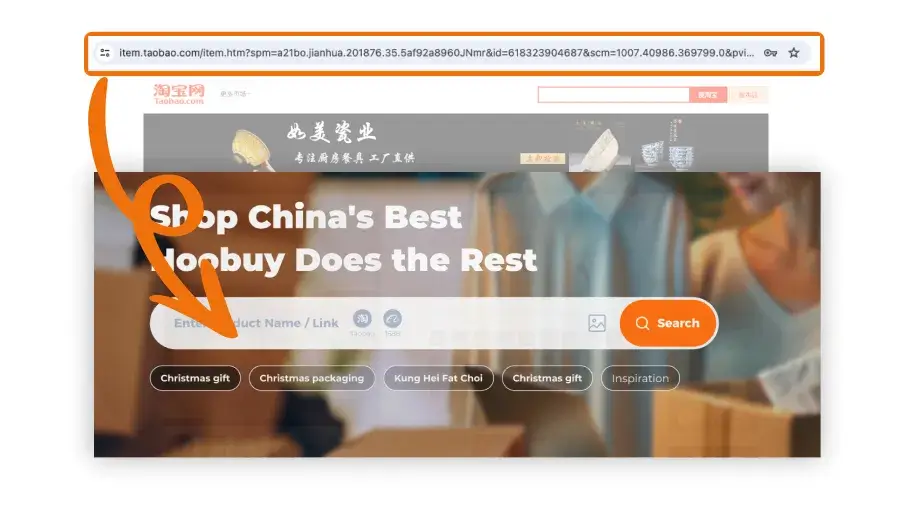
Paste the seller URL into Hoobuy search to open the item you selected.
Open full-size image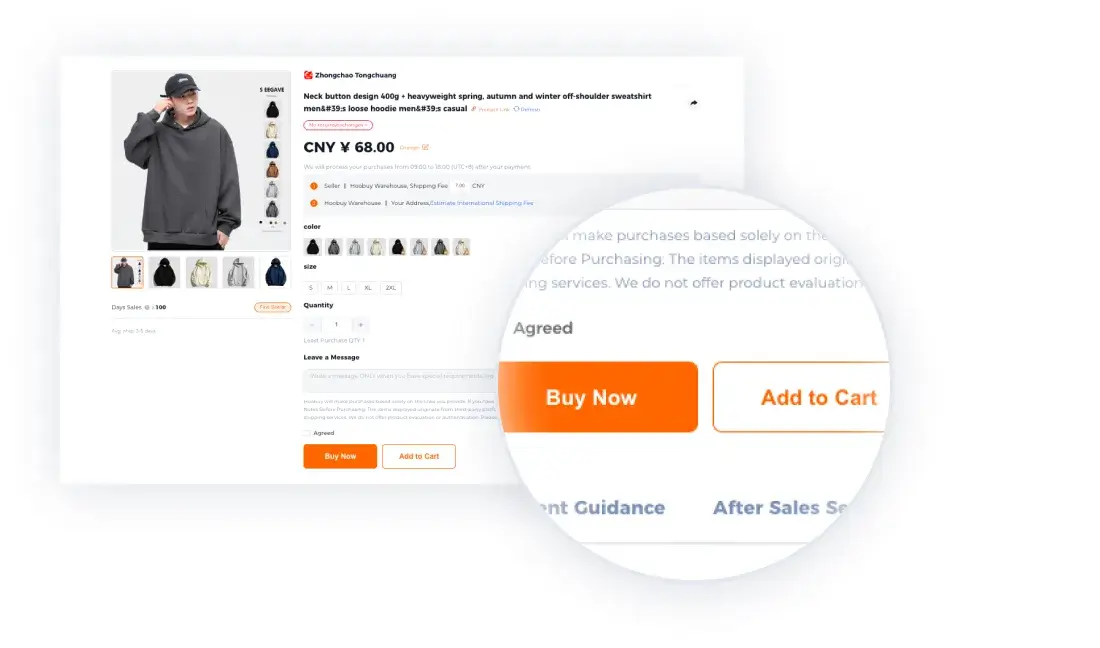
Match the colour, size and quantity before choosing Buy Now or Add to Cart.
Open full-size image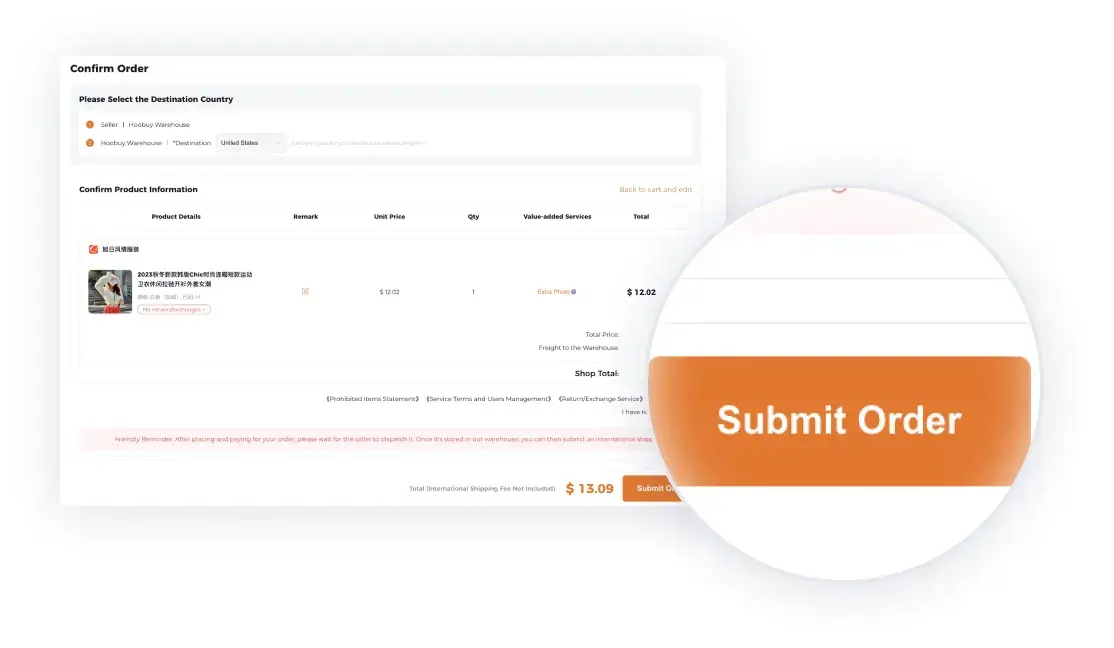
Check the selected goods, destination and purchase charges before submitting the order.
Open full-size imageOfficial tutorial examples. Sample prices and dates are illustrative; use the details shown in your current order.
What is QC?
QC means quality control. In an agent order, it usually refers to warehouse inspection and photos of the actual item received for you. It can help reveal a wrong colour or size, missing parts and visible damage before you pay to ship internationally.
Check which views are included and whether an extra photo or measurement costs more. A photograph cannot authenticate a product or prove its durability or electronic performance. Ask for the view that resolves your specific concern.
Review the received itemHow to check QC photos
Match the photos to the order number and selected variant. Check the complete item, size label, included pieces, marks and visible damage. If the important detail is hidden, request a specific view or measurement.
“Please measure the jacket’s chest flat, from underarm to underarm, with the tape visible in the photo.”
QC means quality-control photos. They help check visible details, but do not authenticate a product or establish how it will perform with wear. GL and RL are buyers’ shorthand for accepting or questioning an item.
Keep a problem out of the parcel
Contact Hoobuy promptly with the order reference, selected option and relevant QC photo. Ask whether a return or exchange is available, its deadline and the postage or service costs. Confirm the refund destination and any withdrawal process if cancelling.
Wait for a clear resolution before adding that item to an international parcel. Check the storage deadline for the other pieces while waiting.
Pack the items you have accepted Resolve an order problem